Wi-Fi Access with a DataCup
The DataCup provides access to digital resources without an Internet connection. It contains two Wi-Fi access points that broadcast a local Wi-Fi network. Users connect to these access points with their devices (phones, tablets, computers) and can browse preselected content as if they were on the Internet.
Login Process for Users
The user opens the Wi-Fi settings on their phone and must choose between the two available Wi-Fi access points, which are numbered. During DataCup presentations, our partners and we have noticed that users often hesitate between the two Wi-Fi access points: thinking it might matter, they don’t know which one to select.
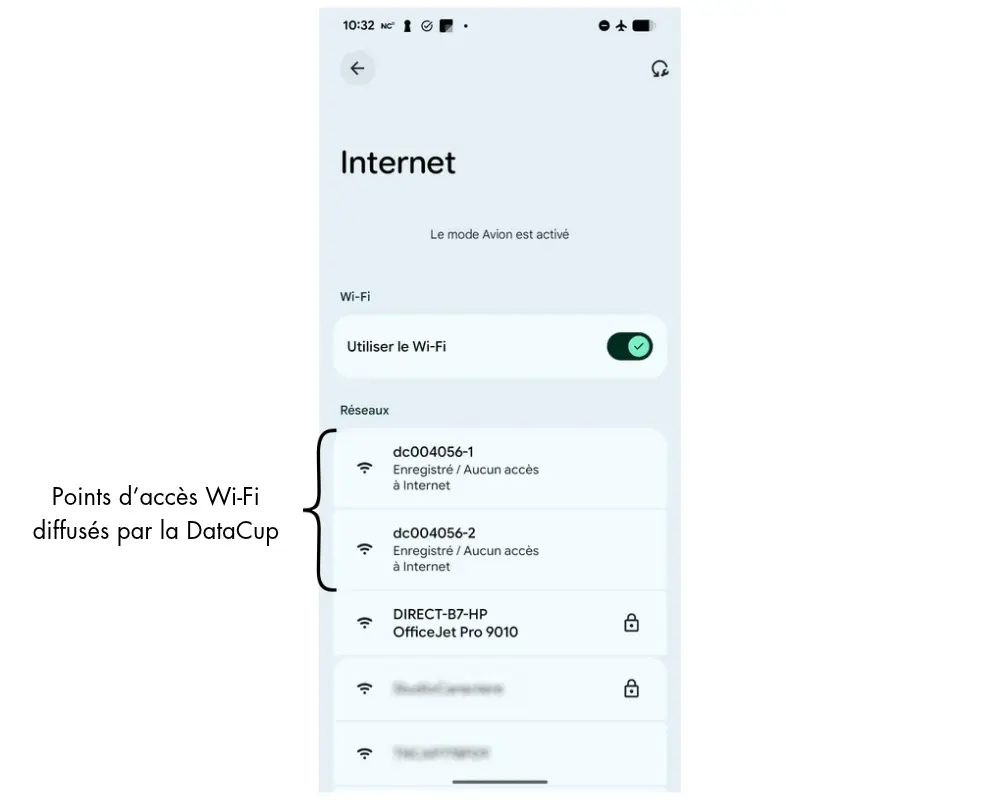
A Little Technical Explanation to Help You Understand
According to the manufacturer's specifications, each access point can support up to 40 simultaneous connections. If this limit is exceeded, other users may be unable to connect at all or may disrupt users who are already connected. This means that up to 80 users can be connected at the same time on a DataCup.
Let's consider the relatively simple scenario of a classroom with 60 students. The teacher instructs the students in the left-hand rows to connect to access point #1 and those in the right-hand rows to connect to access point #2. This ensures that users are evenly distributed between the two Wi-Fi access points.
However, this strategy does not guarantee a high-quality data rate. In fact, the volume of data transmitted is another important factor. Each Wi-Fi access point transmits at 300 Mbps (2.4 GHz), which generally corresponds to an actual data rate of around 150 Mbps, or 1 GB per minute.
Let's go back to our class of students. If 30 students each download a 1 MB PDF at the same time, they will use 30 MB. If 30 students each watch an optimized 1080p H.264 video at 4 Mbps, it is estimated that they will use 900 MB per minute, or 90% of the capacity.
In light of these two issues:
- Hesitation in choosing a Wi-Fi access point and
- The risk of overloading a Wi-Fi access point, especially since video now accounts for a significant portion of content,
we set out to improve the user experience and the performance of the local Wi-Fi network in a way that is completely transparent to the user.
Improving the User Experience
The DataCup’s Wi-Fi network now appears under a single name, thanks to the merging of the two access points. Users can therefore simply connect to the Wi-Fi network broadcast by the DataCup, which is named after its serial number—DC006001, for example. While it may seem simple on the surface, this improvement required a great deal of research and testing by our team!
Optimized Network Performance
To optimize Wi-Fi throughput and reduce the risk of latency, we have introduced a new feature: load balancing. This feature automatically distributes users among Wi-Fi access points based on the number of users and channel congestion, in order to prevent overload.
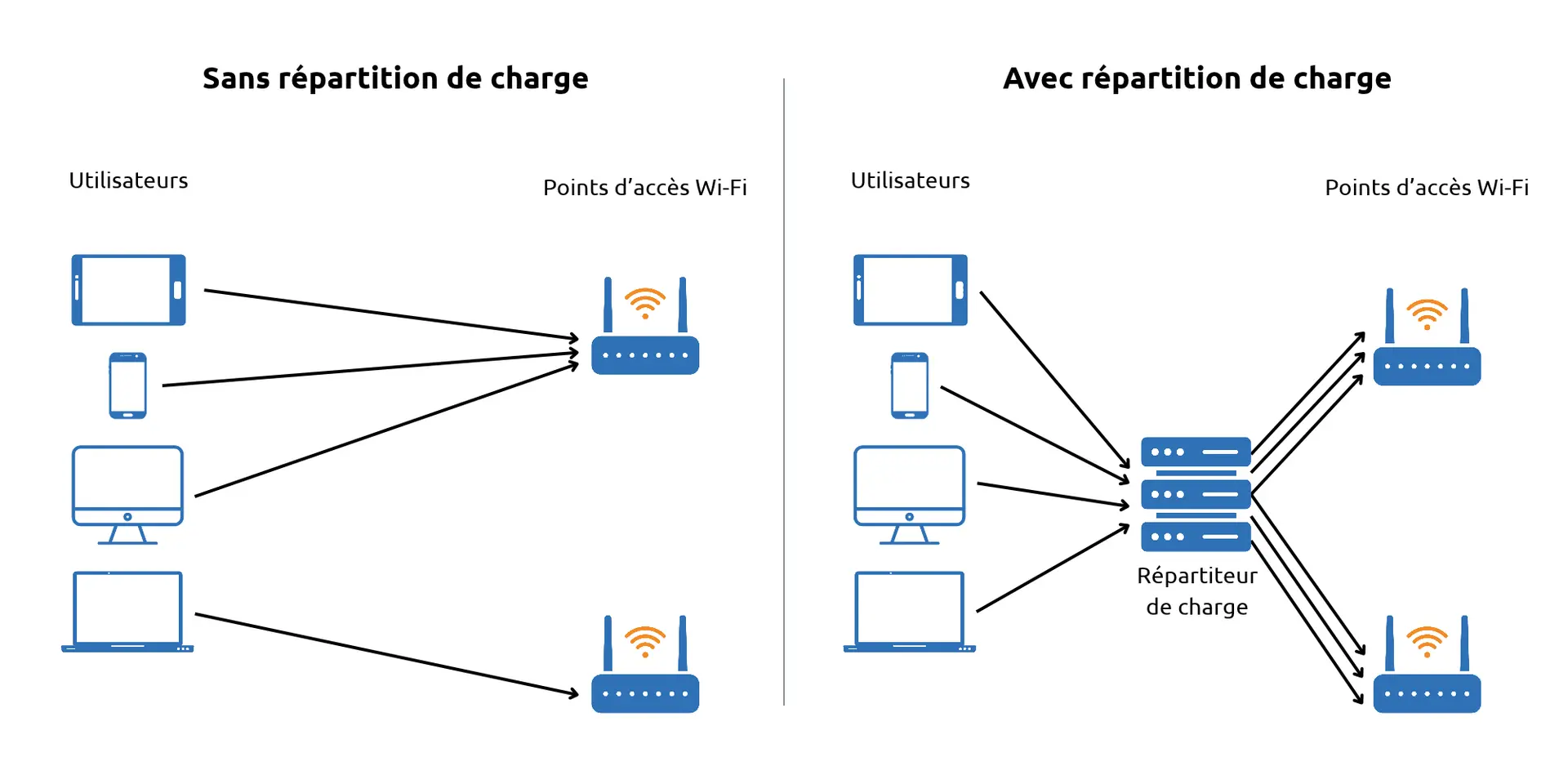
The distribution takes place both when the user first joins in and continuously while the user is on the Wi-Fi. It works on both newer and older devices. And it's completely invisible to the user.
In practice, users will notice that web pages and media load faster, especially when many users are connected to the DataCup at the same time. This also improves application response times.
Who can benefit from these improvements?
This feature will now be automatically deployed on all new DataCup units (version 6). It can also be implemented on older DataCup units upon request, as it is not specific to internal components. The deployment of these features on older versions is in line with our principle of ensuring that our equipment does not become obsolete. So please don't hesitate to contact our support team to get the latest updates quickly and make them available to your users.
(*) Des frais peuvent s'appliquer. Compatibilité des mises à jour à confirmer selon votre matériel.
 Duddal
 SOS Children's Villages Niger


New: Improved Wi-Fi connectivity on DataCup devices