Our most recent discussion on responsible digital use focused on the Brave browser, which offers many interesting features to better protect our privacy and reduce the number of annoying ads.
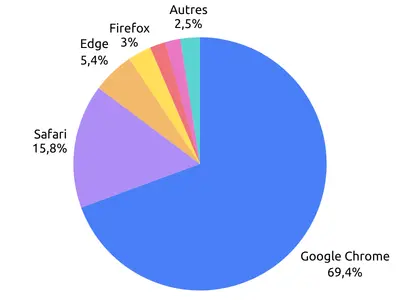
Browser Market Share Worldwide
August 2026 - Statcounter.com
But why, as a user, should you choose an open-source browser?
First, the source code is public and contains no proprietary components: there is no hidden tracking, and it is impossible for the developers to secretly insert ad trackers without anyone knowing. In contrast, in the Google Chrome browser—which is not open source—Google adds tracking features by default (usage statistics, pages visited, etc.).
Open-source projects also benefit from a large community of independent developers and security experts who quickly fix security vulnerabilities.
That doesn't mean, however, that open-source browsers don't collect any personal data or that there's no way to track our online activity. Open source primarily provides transparency and control : since the code is public, it can be analyzed by independent developers or cybersecurity experts and be the subject of public debate. This allows us to better understand what's happening behind the scenes and choose our tools with full knowledge of the facts.
What are the practical benefits for the user?
These benefits vary greatly from one browser to another.
Firefox blocks many third-party trackers.
Brave goes a step further by blocking ads and trackers by default through its “Shields” system.
Open-source browsers often offer a wide range of options for customizing the interface and adding extensions, allowing you to tailor the browser to your liking.
Open source doesn't always mean free: some advanced features may require a fee. These ad-blocking browsers must also find other sources of funding to ensure the long-term viability of their projects (such as “curated” ads, cryptocurrency, etc.). The main difference between them and proprietary browsers lies in the choice they offer users and their transparency.
Can we access social media or YouTube in a browser instead of using the corresponding apps?
Yes, in fact, it’s a habit (shared by several members of our team) that offers many advantages. The most obvious one is that you automatically benefit from the browser’s protections. It also allows you to manage permissions directly in the browser, rather than on an app-by-app basis. For example, ad blocking on YouTube currently works very well. It should be noted, however, that there is an ongoing tug-of-war between ad blockers and publishers, and that the effectiveness of ad blocking can change rapidly. Conversely, on social media platforms such as Facebook, Brave is unable to block sponsored posts in the news feed.
Open source doesn't mean perfect. These projects regularly spark debate, such as when Mozilla published its first terms of service for Firefox in 2025. For its part, Brave has raised concerns about the role it gives to cryptocurrencies.
So, which one should you choose?
Il n’existe pas de navigateur parfait.
Choosing Firefox means opting for an alternative to the Chromium engine. In fact, Firefox is powered by the Gecko engine, which is completely independent of Google. By doing so, you can help ensure the diversity of the web. If you’d like to learn more about this topic, we recommend this excellent article from Mozilla: "Competition, Innovation, and the Future of the Web – Why Independent Browser Engines Matter".
Brave offers the major advantage of blocking ads and trackers with very little configuration.
Chromium, on the other hand, lets you take advantage of the rich Chromium ecosystem while limiting the amount of data sent to Google.
And there are others..., and even some Europeans !
Switching to an open-source browser—whichever one you choose—is, in any case, a step toward regaining some control over your data.
Responsible Digital Technology is also about this: meeting regularly to discuss our practices—sometimes focusing on a tool as simple and commonplace as web browsers—and debating the pros and cons. It’s also about helping the less experienced among us discover the many facets of this choice and shedding light on things we didn’t even know existed.
 Duddal
 SOS Children's Villages Niger

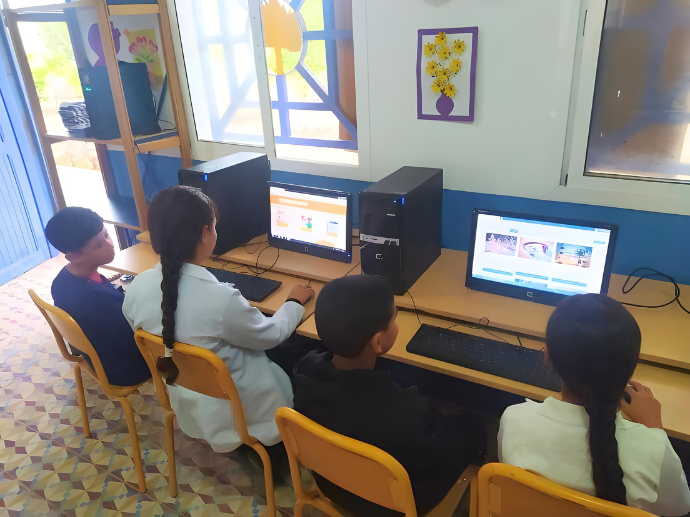

A discussion on responsible digital use, focusing on the benefits of the Brave browser